
Reports | Appointments
- Dec 9, 2025
- 2 min read


Below are explanations of different metrics in the Appointments section:
Appointments Card

Metrics
Appointments = Total # of Appts for the report filter time period
Check-Ins = Total # of Check-Ins for the report filter time period
Check-Outs = Total # of Check-Outs for the report filter time period
On Time Arrive % = % of Appointments for the report filter time period that have met the definition for on-time (+30 Mins to - 30 Mins)
Missed/No Show % = % of Appointments for the report filter time period that never arrived
Avg. Schedule Time = Average Appointment Scheduled time for the report filter time period
Avg. Actual Time = Average Actual Appointment time for the report filter time period
Appointment by Status

Status Definition
Active - Trailer in route to dock or departed dock in route to exit the facility
Completed - Checked Out
InProgress - At a dock being loaded/unloaded
Late Check-In - Dock rule for turn away
No-Show - Scheduled appointment still - no activity
Pending Check-In - Appointment verification, did not open the gate to enter the facility
Rescheduled
Navigation
Yearly
Quarterly
Monthly
Daily
Appointments by Check-Ins (Heatmap)
Definition
Total Appointments by Day for the time period selected / # of Check-Ins during that Hour of Day
Ex:
Report Filter - Last Year
Displaying Tuesday 12:00AM = Last year 201 appointments were scheduled on Tuesday’s - none of them occurred at 12:00AM


Check-In Methods

Status Definition
Kiosk - Kiosk Completed the Check-In
Mobile - Completed the Check-In
SMS - SMS completed the check-in
Website - Manual check-in on the website
Navigation
Navigation is the same as the graph above - it shares the filtering on both graphs
Yearly
Quarterly
Monthly
Daily
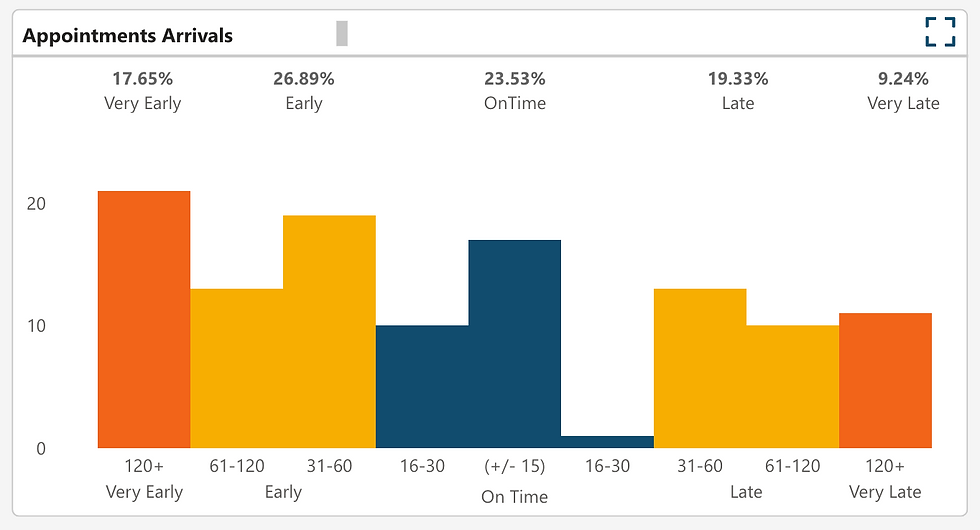
Appointments Arrivals
Status Definition
121 Minutes + = Very Early
31 - 120 + Minutes = Early
30 Minutes Early to 30 Minutes Late = On Time (+- 30 Min)
31 - 120 Minutes - = Late
121 Minutes - = Very Late
Total Duration / Average Duration
Duration
Schedule Duration (Min) = Scheduled duration of the appointment during the schedule process this is on the appointment creation modal.
Note: Customers who are using integrations (sFTP/API) they are most likely setting every appointment to a set length at this time.
Actual Duration (Mins) = Total appointment duration from check-in all the way to check-out

Appointments by Status
Status Definition
Active - Trailer in route to dock or departed dock in route to exit the facility
Completed - Checked Out
InProgress - At a dock being loaded/unloaded
Late Check-In - Dock rule for turn away
No-Show - Scheduled appointment still - no activity
Pending Check-In - Appointment verification, did not open the gate to enter the facility


