
myQE Release Notes - December 17, 2024
- Dec 17, 2024
- 2 min read
Updated: Dec 2, 2025
Enhancements
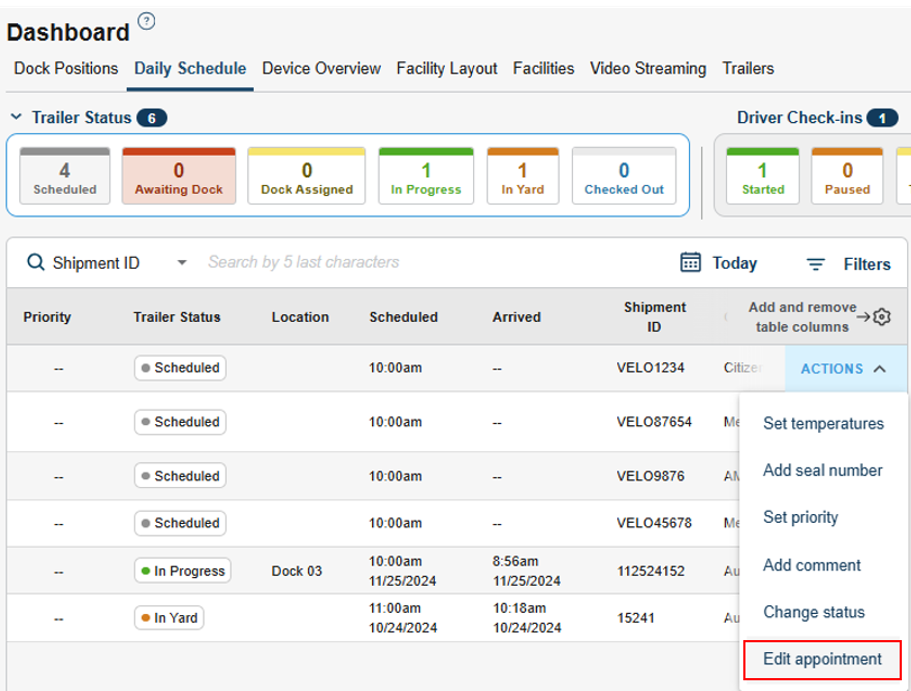
Ability to Change Appt Status (Daily Schedule > Actions > Change Status)
What’s new? Users now have the ability to “force” change the status of an appointment directly from the Daily Schedule.
Why does it matter? Previously, appointments could only progress through the status workflow via actual driver check-ins, dock sessions, etc. This frequently led to data cleanup issues – such as appointments being “stuck” in the system even after the driver had already left with the trailer. Users can now force change the appt status to match reality, and account for occasional misses in the intended process flow.

“Edit Appointment” Action from Daily Schedule
What’s new? In the past, if users needed to edit an appointment for any reason, this had to be done from the Schedule tab. Now, the appointment can be edited directly from the Daily Schedule (Actions > Edit Appointment)
Why does it matter? Users no longer need to flip pages to edit an appointment, which will benefit users that work primarily out of the Daily Schedule. This will also help to enable Outbound appointments in myQ – as these appointments are more likely to be edited after creation (e.g. to update the driver, comments, outbound trailer, etc.)
Inclusion of Pallets & Cases in Daily Schedule Appointment View
What’s new? Users can now easily see the pallets and cases associated with each UUID on an appointment from the Daily Schedule.
Why does it matter? Previously, users would need to go to the Schedule > Edit Appointment to see this info. This makes important info more accessible to daily myQ users.

More Info on Dock Blocks
What’s new? Users can now see 1) who blocked a dock and 2) how long it’s been blocked for (in addition to the Block Reason and comment)
Why does it matter? Increased visibility into why a dock is blocked.

Blocked Docks on Dock Plan
What’s new? Users can now see on the Dock Plan if a dock was blocked at any point in time.
Why does it matter? Previously, if a dock was blocked earlier in the day, it would show as a blank space on the Dock Plan – which made it challenging to retrospectively analyze and understand why a particular appointment was assigned to a specific door. Now, these blocks will show on the Dock Plan which will make troubleshooting much easier.
Bug Fixes
Blank “Trailer #” column on Daily Schedule for OB Appts
We have fixed an issue that was causing the “Trailer #” field on the Daily Schedule to be null for Outbound appointments – even if there was a trailer assigned.


