
Yard Management | Task Management
- Nov 26, 2025
- 3 min read
Updated: Dec 5, 2025
Yard Management encapsulates the processes of optimizing and automating the movement, storage, and flow of trailers and other assets within a facility’s yard.
Benefits
The myQ Enterprise Yard Management module provides real-time collaboration, automation, and control over all yard activities, helping the facility reduce delays, improve throughput, and enhance overall efficiency.
There are three main components of myQ Enterprise Yard Management Module:
Task Management
In this post we'll dive into Task Management
Task Management
myQ Enterprise provides a Task Management module to provide real-time visibility, collaboration and automation of the movement of Trailers within your facility. In this module you can create Trailer move tasks to orchestrate the activities within the yard.
myQ Enterprise provides a tablet-optimized mobile app purpose-built for Yard Drivers to provide all the information needed to manage Trailer move tasks.
Creating a Task
A move task (yard to door, yard to yard, door to door, door to yard) can be created in several different ways – depending on user preference and the context of the move task.
Creating from the Trailers | Tasks Tab- This use case is for managers or supervisors to generate a move task within the myQ platform from their desks in the warehouse.
From the dashboard navigate to the Trailers module

Navigate within the Trailers module to the Tasks tab

Within the Tasks tab press the add button

Fill in the Task details and Save the task.

From the Dock Positions Dashboard (Actions > Assign Trailer)
The use case here is to initiate a Trailer move to a specific Dock from the Dock Positions tab. In this case the user will choose Actions | Assign Trailer
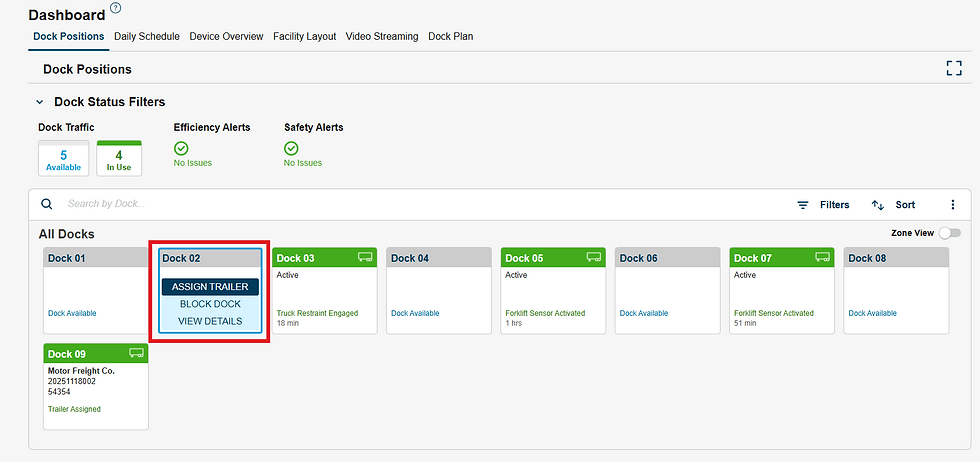
Where the Trailer assignment can be made and associated Task automatically created as shown below.

Creating from the Daily Schedule
In this use case, a supervisor or manager is initiating the Task from a specific Appointment or Trailer that needs action. From the Daily Schedule OR Trailers Tab (Actions > Load Trailer / Assign to Dock / Assign to Yard)
Each action relating to trailer movement will have a checkbox to automatically create the associated Task

Automated Task Creation
In addition to these manual Task creation methods, myQ can be configured to utilize dock sensors to create Tasks automatically, freeing up your managers and supervisors to do other higher value work.
Auto-Pull Task
Pull tasks (door to yard) can be created manually via the Tasks tab / Dock Positions dashboard, or automatically (recommended) automatically based on IoT sensors at the dock, which would deem the dock session complete and the trailer safe to pull (equivalent of green light on outside of door)
Auto-pull task creation is dictated by the checkboxes shown in the above images whenever a trailer is being moved to a door. These checkboxes can be configured to be always on / off by default, and then the user can decide on a case-by-case basis if a pull task will be needed right before the trailer is assigned to the door
Auto-Move Task Creation
Ability to automatically create move tasks whenever associated appointments are created. This can be managed within Task Settings (Trailers > Task Settings)

Contact your Customer Success Manager to learn how myQ Enterprise can provide unparalleled visibility and automation for your Yard and Dock Management!

